Meta Lead Ads into your distribution, without a posting integration
Instant Form leads sit in Meta until someone exports them. Connect the account instead and they reach your buyers in seconds, with no integration to build.
Facebook and Instagram Instant Forms convert well and then strand the lead. It sits in Meta's Lead Center until someone exports a CSV, and by the time it reaches a buyer the consumer has moved on.
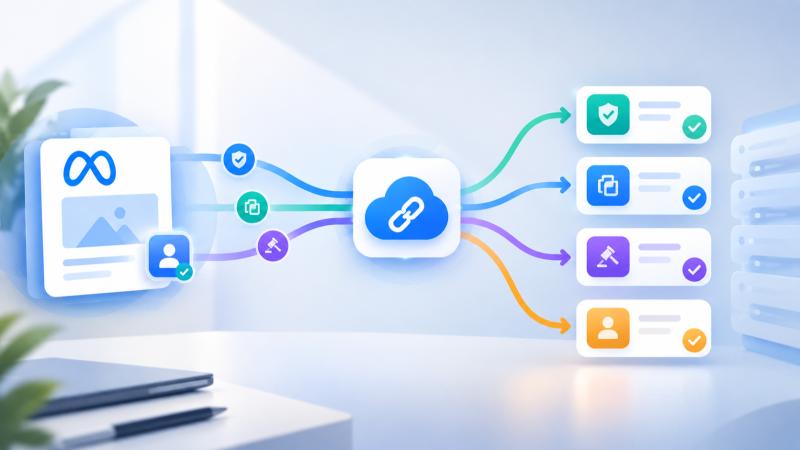
Datahubb now collects those leads directly. You link a Facebook account once, bind a form to a campaign, and leads route through your normal pipeline within seconds of submission.
Why this is different from your other sources
Every other source in your platform posts to you. A partner builds against your API, authenticates with a key, and pushes leads in. That works, and it is the right model when the partner runs their own system.
It is the wrong model for your own Meta ads. You are not integrating with a partner. You are trying to collect leads from a form you already own, on an ad account you already pay for, and building a posting integration to do that is work with no upside.
So this one runs the other way. Meta notifies Datahubb, and a job pulls the lead, maps it, and drives it into the campaign. There is no endpoint to build, no key to share, and nothing running on your side that can quietly stop.
Speed is the whole point
Instant Form leads decay fast. The consumer tapped a form inside a feed, prefilled it in three seconds, and went back to scrolling. Contact rate falls off a cliff within the hour.
A CSV export loop is measured in days. This is measured in seconds, and the lead lands in your campaign already run through your rules, deduplicated, checked by whatever integrations you run, and delivered to whichever buyer won it.
That last part matters more than the ingestion itself. The lead is not just captured faster. It arrives in a system that already knows who should buy it.
Set it up
- Open Integrations and open Meta Lead Ads.
- Click Connect Facebook and complete the login. Grant every permission it asks for, because a missing one shows up later as an empty list of forms rather than as an error.
- Pick a Page, then one of its Instant Forms.
- Choose the campaign, the supplier the leads should be attributed to, and a traffic source if you are running an internal supplier.
- Open Field mapping and pair each form question with a campaign field.
The mapping step has a coverage check that is worth reading rather than clicking past. It names any required campaign field with nothing feeding it, verified against the rejection your ingest would actually produce. Fields covered elsewhere are not flagged, so supplier defaults and the automatically captured IP address and user agent do not show up as gaps.
The connection is stored server-side, not in your browser session. Any admin can add more forms to a granted Page later without signing back into Facebook.
Meta drops leads, so this does not rely on Meta alone
Here is the part most integrations get wrong.
Meta's lead notifications are not reliable. A meaningful share never arrive, and Meta does not resend them. Anything built purely on the webhook loses leads silently, which is the worst failure mode available: no error, no alert, just fewer leads than the ad account says you paid for.
A scheduled sweep runs alongside the webhook, asks Meta directly what leads each active form has, and pulls in anything not already taken. Every lead is claimed before it is fetched, so a recovered lead and a late webhook cannot both ingest the same submission.
The sweep is bounded by Meta's own 90 day lead retention. Beyond that window the lead is gone from Meta's side and nothing can recover it.
Running it day to day
Each connected form carries its own stats: total received, received in the last seven days, accepted, rejected, and when the last one arrived. That is usually enough to spot a form that has gone quiet before anyone else does.
Three controls sit on each row, and they do different things:
- Pause stops routing but keeps the Page subscribed on Meta, so resuming is instant. Leads that arrive while paused are dropped.
- Archive stops routing and unsubscribes the Page, provided no other active form still uses it. The row is kept for history and stats.
- Health runs live preflight checks on the Page token, the leadgen terms, the Page subscription, the form itself, the route, and the supplier and campaign. It is there so a broken connection is diagnosable without anyone opening a Graph API console.
To stop all Meta intake at once, deactivate the integration. Both the live webhook and the recovery sweep check that switch before ingesting, so deactivate genuinely means deactivate.
Edge cases worth knowing
- Resuming a paused form does not backfill by default. There is an opt-in catch-up for the downtime window, and it is off deliberately, because lead buyers reject stale data and a flood of week-old leads is worse than none.
- Two forms on one campaign can map differently. Per-form mapping wins over the per-campaign override, which wins over the global default.
- A form already routed elsewhere prompts before it moves. Datahubb asks rather than silently hijacking a route another campaign depends on.
- Business Manager Pages need the business permission. If a Page you administer through Meta Business Manager does not appear at connect time, that grant is what is missing.
- Field defaults are fallbacks, not overrides. A real answer from the form always wins, and the default only fills a field the form never asked about.
What this changes about buying Meta traffic
The interesting consequence is not the integration. It is that your own Meta spend becomes just another source on the scorecard.
The leads carry a supplier and, optionally, a traffic source, so they show up in the same acceptance rates, rejection breakdowns, revenue-per-lead figures and margin as every partner you buy from. You can compare a Facebook form against a partner's feed on the same axes, and route them differently if they deserve different treatment.
Most operators run their paid social and their lead distribution as two separate businesses that meet in a spreadsheet at month end. They do not have to.
Frequently asked questions
Comments
No comments yet — be the first to share your thoughts.