Onboarding the buyer who has no endpoint
The buyer wants your leads and has no API. Deliver into a Google Sheet they already own, and stop losing deals to a six-week integration nobody will build.
A buyer agrees terms, agrees a price, and then says their team works out of a spreadsheet. Their developer is booked for a quarter. The deal stalls.
That buyer is not a bad buyer. They are a buyer whose operational reality does not include an HTTP endpoint, and there are more of them than the lead industry likes to admit.
The integration tax nobody prices in
Every buyer relationship carries a fixed cost before the first lead ships: someone builds an endpoint, someone maps the payload, someone tests it, someone fixes the thing that broke.
For a large buyer taking thousands of leads a month, that cost is trivially worth it. For a regional buyer taking forty leads a week at a good price, it is the entire reason the relationship never starts. The margin was fine. The setup was not.
So the roster ends up shaped by who could integrate rather than who could pay. That is a bad filter to have applied by accident.
Two delivery methods that need no engineering
Email. The lead arrives in an inbox. You control the recipients, the subject, the HTML body, reply-to, CC and BCC, custom headers, and optionally a CSV attachment with the columns you choose. A person works the message.
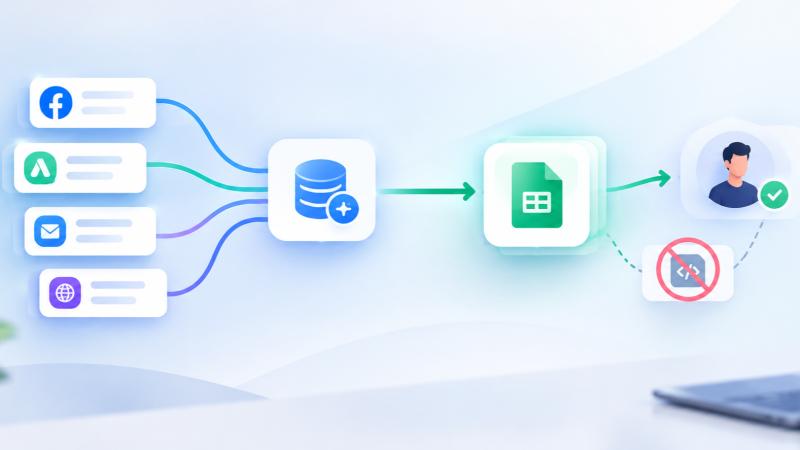
Google Sheet. Each lead becomes a row in a spreadsheet the buyer already owns. They connect their own Google account, you map columns to values, and rows land under the right headers.
Both consume caps, schedules, rules and distribution exactly like an HTTP buyer. The only thing that changes is the transport.
When a sheet beats an inbox
Email suits a buyer whose people work leads one at a time as they arrive. A sheet suits a buyer whose people work a list.
The sheet also gives you something an inbox does not: the buyer can add their own columns beside yours. Contacted, outcome, notes. The lead you delivered and the result they got sit on the same row, which is the shortest path to a returns conversation grounded in something other than memory.
Setting it up
The Google connection belongs to a buyer that already exists, so the order matters:
- On the campaign Buyers tab, set Delivery Method to Google Sheet and save the buyer.
- Reopen the buyer and click Connect Google. On the consent screen, keep the box for access to the specific Google Drive files you use with this app checked. That one permission covers both opening the file picker and writing the rows.
- Click Choose from Google Drive. Google's own picker opens, including files on a Shared drive.
- Set the tab name, or leave it empty to use the first tab.
- Map each column header to the value that fills it. Values take field tokens or plain text.
- Save and test.
Two details that save support tickets later. Datahubb only receives access to the single file the buyer picks, not their Drive, which is the answer to the question every buyer's IT person asks. And values line up with the sheet's header row by name, so the buyer can reorder their columns without breaking the delivery.
Each buyer connects their own Google account, so two buyers on one campaign can write to two entirely separate accounts.
Give every row an ID the buyer can trust
The one thing a spreadsheet buyer struggles with is deduplication. A retry, a resend, or a redistributed lead can produce a row that looks new.
Drop a generated unique identifier into a column. It is created once per delivery and frozen, so the same value appears in every part of that delivery, and a retry of the same delivery reuses it rather than minting a new one. The buyer can then dedupe on that column with a formula and be right.
Two more generated values are available in the same way: a random number, useful as a cache-buster, and the timestamp of the request in UTC. All three work in sheet columns, email fields, and HTTP bodies alike, so the ID in an email subject matches the one in its body.
Edge cases worth knowing
- A test delivery is a real delivery. An email buyer receives a real message and a sheet buyer gets a real row. Point your first test at an address or a tab you are happy to clean up.
- Datahubb does not create the spreadsheet. The buyer owns it and shares nothing beyond the one file they pick.
- Disconnecting clears the saved spreadsheet. A newly connected account cannot inherit a file it may not be able to open.
- An emailed lead cannot be rejected at delivery. There is no reply to read, so the delivery succeeds once the message is sent. Price accordingly.
- The picker needs a normal browser window. Ad blockers, blocked cookies and private windows are the usual reasons it does not open.
What this is actually for
Not for your biggest buyer. That buyer should be on ping/post with response mapping and a real integration, because the volume justifies it.
It is for the buyer whose deal dies in procurement, the pilot you want running this week rather than next quarter, and the regional player whose price is good and whose engineering capacity is zero.
Those buyers are usually the difference between a campaign with two bidders and a campaign with five. Worth more than the integration you skipped.
Frequently asked questions
Comments
No comments yet — be the first to share your thoughts.