Closing the conversion loop between your buyer and your source
A CPA conversion has to travel from the buyer to you to your affiliate. Here is what breaks on that path, and how to prove which half failed.
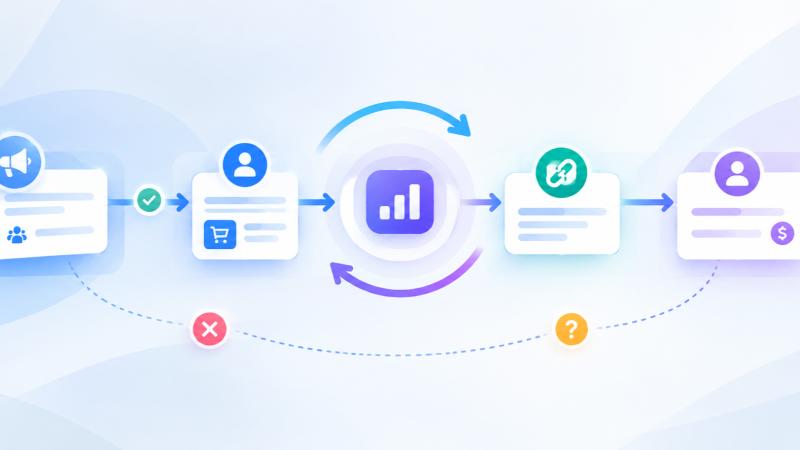
Your buyer converts a lead three days after you sold it. Your affiliate needs to know, because that is what they are paid on. Between those two facts sits a chain of calls that either works or fails silently.
Silently is the problem. Nobody complains about a conversion that arrived. They complain about a payout that did not, six weeks later, with no way to reconstruct what happened.
The loop has two halves and they fail differently
A conversion-priced lead makes two trips.
Inbound. The buyer tells you the lead converted. That is a call arriving at your platform, authenticated by whatever you agreed, carrying an identifier the buyer knows and a status.
Outbound. You tell the traffic source or supplier that drove the lead. That is a call leaving your platform for their endpoint, carrying an identifier they know and a payout.
Those are separate systems with separate failure modes. The buyer's call can never arrive. Your call can arrive and be rejected. Your call can go to an address nobody answers. Each one produces the same visible symptom, which is an affiliate asking where their money is, and each one has a completely different fix.
So the first thing worth insisting on is a view that shows both halves as distinct events rather than blending them into one number.
Why one conversion is two rows
In Datahubb's Conversions page, a single conversion normally produces two rows sharing a transaction ID. One incoming, one outgoing.
That reads as duplication until you understand it, and then it becomes the most useful property of the page. If only the incoming row exists, the buyer told you and you did not tell your source. If only the outgoing exists, something fired without a buyer confirmation behind it. Both rows present with a good delivery status means the loop closed.
The direction is written from the platform's point of view, which is the opposite of how a partner describes the same event. Your affiliate calls your outgoing postback "the conversion I received". The column says outgoing, meaning we sent it. Worth saying out loud once in an onboarding call, because the vocabulary mismatch causes more confusion than the mechanism does.
Deliverability is three states, not two
Most systems compare an HTTP code to 200 and paint everything else red. That is wrong in both directions: it marks a perfectly good 204 as a failure, and it flattens two genuinely different problems into one colour.
The three states worth separating:
- Delivered. The endpoint accepted it. Done.
- Failed. The endpoint answered and refused. Their system is up and rejected your call, so the fix is in the payload, the authentication, or the identifier you sent.
- No response. Nothing came back at all. There was no answer, which usually means an unreachable or blocked URL. The fix is the address, not the payload.
Chasing a payload bug when the URL was never reachable is a wasted afternoon, and the two look identical if your reporting only knows pass and fail.
The evidence problem
The hardest support conversation in this business is a buyer saying "we fired the postback" when your platform shows nothing.
You cannot resolve that from your own outbound logs, because the claim is about something that either did or did not arrive. What settles it is the inbound record: the address the request came from, and the headers it carried. If nothing arrived, you can say so with confidence rather than as a position. If something arrived and was rejected, you can show them exactly what they sent.
Datahubb stores both on incoming rows, with credential headers redacted. Anything older than that stored nothing, so a historical dispute is still a matter of opinion.
Find the conversion someone is asking about
Partners never quote your identifiers. They quote theirs, or a fragment of something they read off another screen.
Search on the Conversions page matches part of either the transaction ID or the external ID, case-insensitively, which covers both. The filters then narrow by campaign, by partner, by buyer, by direction, and by event type.
Two behaviours are worth knowing before you conclude something is broken:
Filtering by a buyer hides every outgoing row. Buyers only exist on incoming rows, because an outgoing postback is addressed to a partner and has no buyer at all. That is the question being answered, not a bug.
The Partner filter covers traffic sources and suppliers in one grouped list. They are different kinds of party that frequently share a company name, and IDs are only unique within a type, so a flat list could not tell a traffic source from a supplier with the same number.
Suppliers can be told too
For a long time the assumption was that the party you notify is an affiliate under your own supplier. That covers self-hosted traffic and misses a common arrangement: an external supplier posting leads to you on a conversion-priced contract, who has exactly the same need to know their lead converted.
A postback can now be addressed to a supplier rather than a traffic source. Which type is correct depends on the lead: a lead carrying a traffic source resolves to that, and a lead from an external supplier, which never carries one, resolves to the supplier.
If you have external suppliers on CPA terms and have been reconciling them by spreadsheet, that is the setting to change.
Edge cases worth knowing
- A partial return sends nothing. If a lead sold to several buyers has one sale returned while another still stands, the lead is still sold and your source is told nothing. Only a full return fires.
- A buyer's retries are normal. Buyers re-send after network failures and on schedules. A repeat rejection on a lead already resolved is logged and short-circuits rather than moving the status twice.
- Preset sends are not ordinary postbacks. A conversion sent through an ad platform preset is built to that platform's schema and lands in an ad account rather than a partner's endpoint. It is flagged as such, because what to check when it goes wrong is different.
- Manual fires exist for backfills. When a buyer reconciles by file rather than by API, upsert the conversions onto the leads and fire the postbacks afterwards. Make sure the receiving end is idempotent first.
The habit that prevents the six-week argument
Once a week, filter Conversions to the last seven days and scan the delivery column for anything that is not delivered.
A no-response cluster on one partner means their URL changed and nobody told you. A failed cluster means your payload and their expectations have drifted apart. An incoming row with no matching outgoing means a config that should have fired did not.
All three are ten-minute fixes in the week they happen, and none of them are ten-minute fixes when they surface as a payout dispute at quarter end.
Frequently asked questions
Comments
No comments yet — be the first to share your thoughts.